
Pull vs Push Technology

Have you ever found yourself standing in front of a two-way door at the entrance of a mall, unsure whether to push or pull it? This can be an embarrassing and frustrating experience, especially if you're with other people. As developers, we sometimes find ourselves in similar situations when building scalable applications. There are essential cases in which you might subconsciously wonder whether your application is better suited for a push or pull communication strategy.
Welcome to this new issue, where we continue to learn about the basics of software engineering. The focus is on understanding how two main types of network communication—push and pull technologies—affect the way we interact online. We will explore the following topics:
What is Pull technology, how does it affect our communication online, and what are some tools we can use to implement it in our app?
The limitations of Pull technologies and why we should transition to push technologies
Finally, we will talk about various examples of Push technologies, such as Web Push, HTTP live streaming, and WebSocket.
Each of these technologies serves a unique purpose and addresses different problems in the digital world. Let's learn how these technologies make our online interactions better.
What is Pull Technology?
Traditional forms of media such as radio and television provide information to end-users based on the aggregate needs of listeners and viewers, respectively. This means that the information presented is aimed at satisfying the interests of the majority. However, with the advent of the internet, it became increasingly apparent that users wanted to have more control over their access to information. They wanted to be able to choose what they saw and when they saw it. This is part of what led to the successful reception of pull technology by users.
Pull technology refers to a communication method where the user initiates the request for information. It allows users to choose what information they want to receive and when they want to receive it. This is in contrast to push technology, where the publisher or central server initiates the request for a specific transaction. In the case of push technology, the user is presented with information that is pushed to them, regardless of whether they want it or not.
Traditional media outlets have had to change to remain important in the digital age. Now, many radio and television stations offer online streaming services. Additionally, they have interactive content, so users can engage with the programming. Traditional media outlets can now connect with their audiences in new and innovative ways by using social media.
Pull technology lets people choose where to look for information. It makes people active in finding knowledge instead of just receiving it. With pull technology, people can explore, experiment, and innovate because they have the power to decide how they want to learn.
This leads to users who are more involved and knowledgeable and an information system that is more flexible and responsive to users' needs. Pull technology is a big change from the usual top-down way of sharing information, and it focuses more on individual choice and control.
Pull technology is useful when the client only needs certain data at certain times. This saves network resources and cuts down on sending unnecessary data.
Pull technology is often used in web applications, where clients request data from web servers. It can also be used in data analytics to retrieve specific data sets on demand, making it easier to process and analyze large data sets.
Let’s discuss some of its technologies:
Some Pull Technologies
In this section, we discuss some of the technologies used to implement the pull communication strategy.
HTTP Pull
The HTTP Pull method is a technique that clients use to fetch data from a server. It involves sending a request to the server and waiting for a response that contains the data. The connection is then closed. Whenever the client needs to get the latest version of the data, it creates a new connection and repeats the process. This method is commonly used on the internet to fetch HTTP pages from websites.
When a client wants to retrieve information from a server, they may use one of two methods: REST API calls or Remote Procedure Calls (RPC). In both methods, the client initiates a request to the server, specifying what information they want. The server then responds with the information the client requested after processing the request.
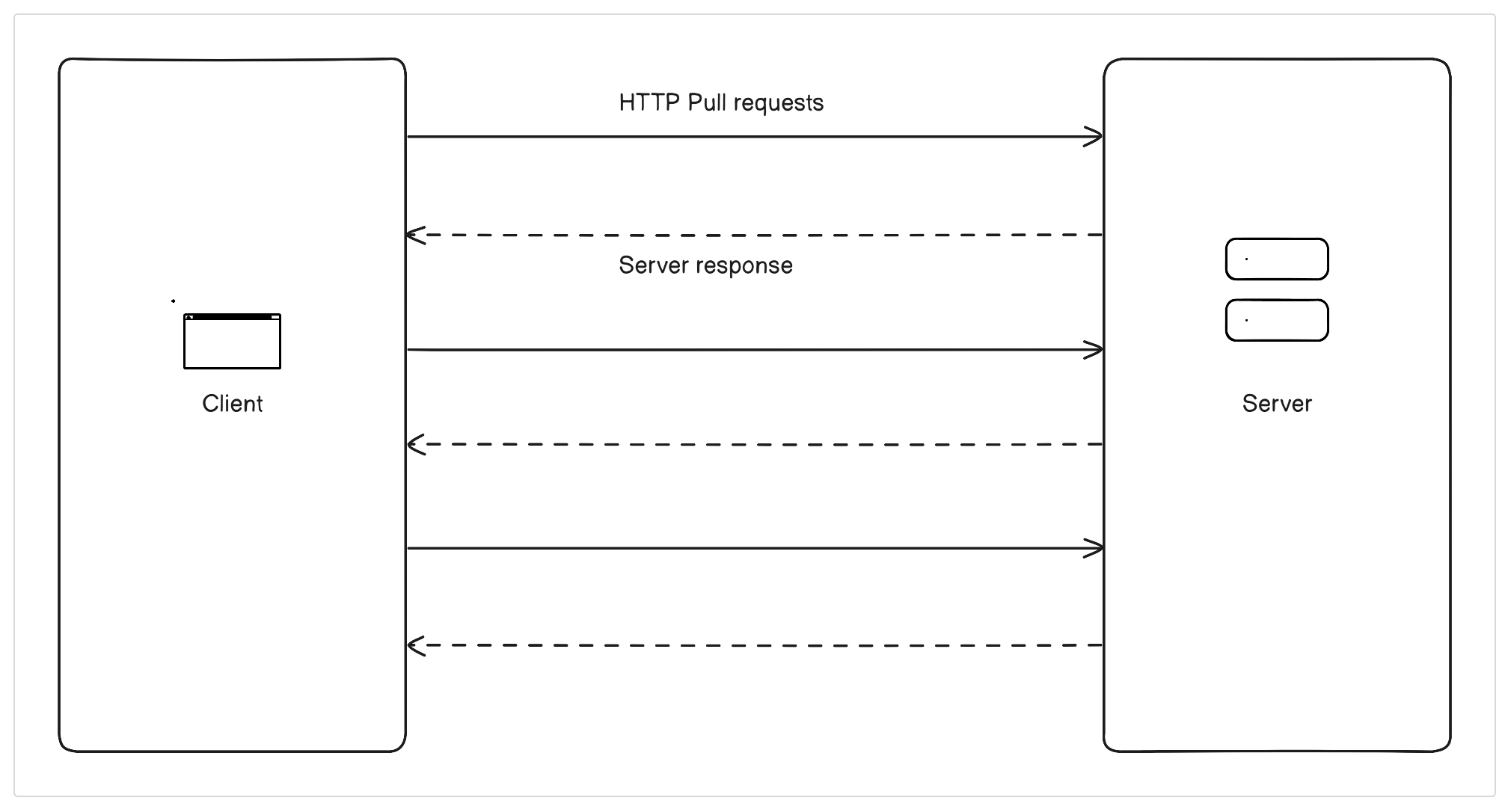
REST API calls and RPC are commonly used in web applications to retrieve data from a server. They are both examples of pull technology, where the client initiates the request for data. Once the server has processed the request, the data is pushed back to the client. This is different from push technology, where data is sent to the client without the client requesting it.
Although the HTTP Pull method is effective in getting the latest data from the server, it may cause some delay as the client has to keep requesting updated data from the server.
POP3
When getting email messages from a server using POP3, a client can ask for new messages every few minutes. This makes it seem like the email is coming in right away to the user. However, this also makes the server and network work harder to keep up.
POP3 (Post Office Protocol Version 3) is a way email programs get email from a server. It's a basic, text-based way to connect to a server, get email, and show if it's been read or not.
Several common email clients, including mobile apps like Apple Mail and Gmail, let users set up their email accounts to use POP3. This can be the main way to get email or an option to use alongside other protocols like IMAP (Internet Message Access Protocol).
How POP3 Works
It operates by establishing a connection between the email client and the mail server and exchanging a series of commands and responses to perform various tasks.
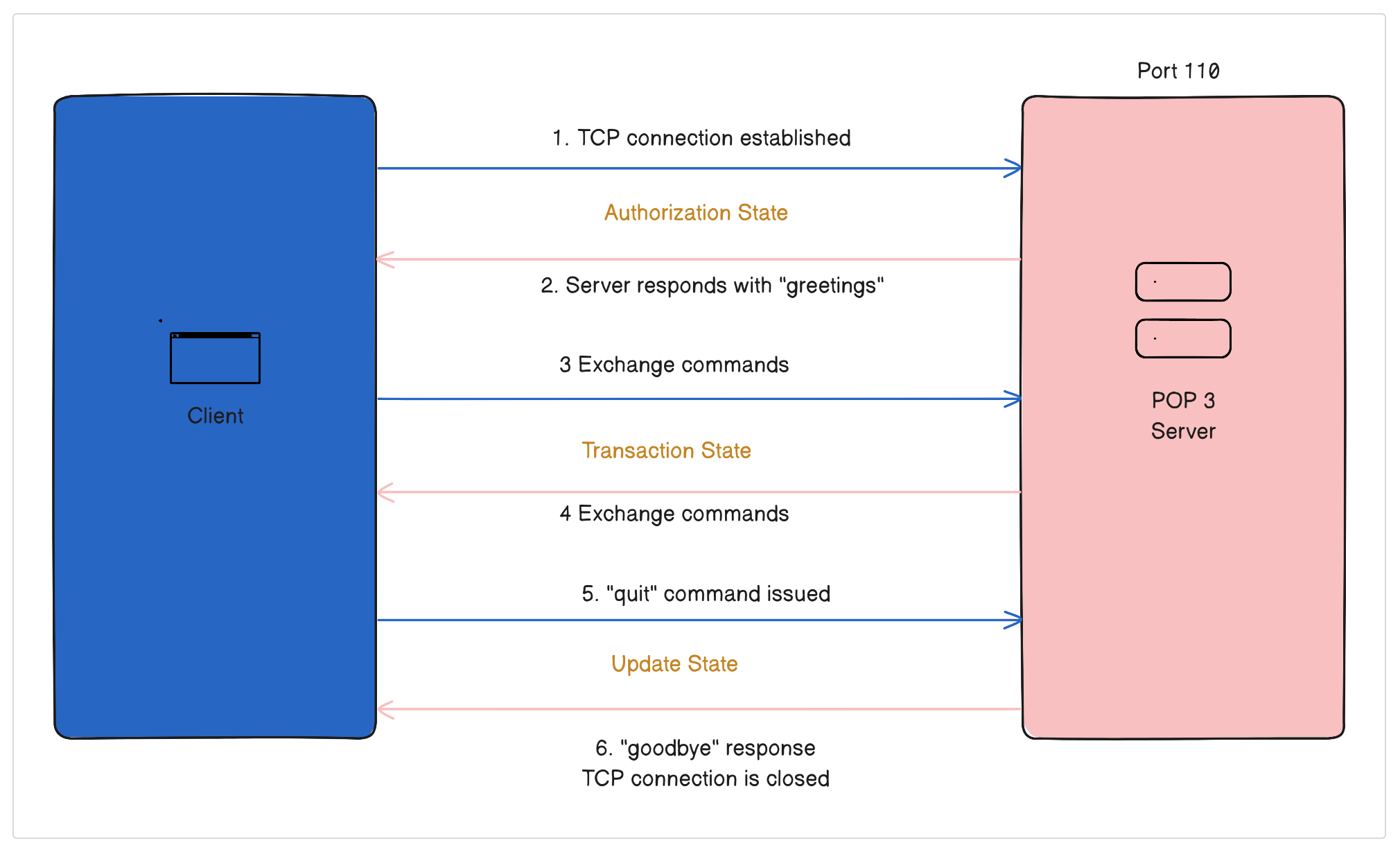
To retrieve emails using POP3, the client connects to the server host on TCP port 110. The server starts the POP3 service and responds with a greeting. This marks the beginning of the authorization state.
In the next step, called the "transaction" state, the client and server communicate with each other by sending commands and responses until the connection is closed or stopped. The client can send commands using words that are not case-sensitive, along with any necessary information. The server responds with a status indicator, a keyword, and sometimes extra information.
When the client types "quit" the session changes to an "update" state. The POP3 server frees up any resources from before and says "goodbye" before closing the TCP connection.
After the POP3 session enters the update state, the POP3 server deletes the message.
POP3 does not support real-time synchronization of email messages between the client and server, so the client must manually check for new messages.
Multiple devices cannot access the email account at the same time. Each device will have its own copy of email messages.
Web Feeds
Next, another way of pulling information is through a web feed, which is a way of sharing frequently updated content in a specific format. People can subscribe to a channel by adding the feed resource address to a news aggregator client, also called a feed reader or news reader.
Users usually subscribe to a feed by entering the URL, clicking a link, or dragging it from the browser to the aggregator. This is how "RSS and Atom files give your computer news updates from a website in an easy way".
A feed is a collection of different types of content, such as headlines, full-text articles, excerpts, summaries, or links to content on a website, along with various additional information. Web feeds usually contain content from news websites and blogs, but they can also deliver structured information, like weather data and search results, that can be displayed as HTML content.
Some examples of common web feed formats are:
Atom
JSON Feed
RSS
Let’s discuss them briefly.
Atom
Atom was created as a different option from RSS, which we'll talk about soon. Ben Trott was a supporter of the new format that became Atom. He thought that RSS had problems and limitations, like no new ideas and the need to stay compatible with old versions, and that a new design had some advantages.
Atom is popular, and people use it, along with other web-syndication formats, for different things like journalism, marketing, bug reports, or anything that needs regular updates or publications.
An example of a document in the Atom Syndication Format:
<?xml version="1.0" encoding="utf-8"?>

    <feed xmlns="http://www.w3.org/2005/Atom">
	<title>Example Feed</title>
	<subtitle>A subtitle.</subtitle>
	<link href="http://example.org/feed/" rel="self"/>
	<link href="http://example.org/"/>
	<id>urn:uuid:60a76c80-d399-11d9-b91C-0003939e0af6</id>
	<updated>2003-12-13T18:30:02Z</updated>

	<entry>
		<title>Atom-Powered Robots Run Amok</title>
		<link href="http://example.org/2003/12/13/atom03"/>
		<link rel="alternate" type="text/html" href="http://example.org/2003/12/13/atom03.html"/>
		<link rel="edit" href="http://example.org/2003/12/13/atom03/edit"/>
		<id>urn:uuid:1225c695-cfb8-4ebb-aaaa-80da344efa6a</id>
		<published>2003-11-09T17:23:02Z</published>
		<updated>2003-12-13T18:30:02Z</updated>
		<summary>Some text.</summary>
		<content type="xhtml"><div xmlns="http://www.w3.org/1999/xhtml">
		<p>This is the entry content.</p></div>

		</content>
			<author><name>John Doe</name><email>johndoe@example.com</email></author>
	</entry>

</feed>
Atom became more popular because it allowed users to easily export their entire blog or parts of it for backup or to import into other blogging platforms. This flexibility allowed some websites to give their users a choice between RSS or Atom feeds.
However, even though many people use them, RSS feeds are still the most popular. Here are some reasons why you might not want to use the Atom format exclusively:
RSS 2.0 support for enclosures led to the development of podcasting. Many podcasting apps, including iTunes, can use Atom 1.0, but RSS 2.0 is still the preferred format.
Some sites still only use one format for their feeds. For instance, CNN and The New York Times only provide RSS 2.0 formats for their web feeds.
News articles about web feeds have started using the term "RSS" to refer to different versions of the RSS format, like RSS 2.0 and RSS 1.0, and the Atom format.
JSON Feed
The file format of a JSON feed for Web Syndication is JSON, as opposed to RSS and Atom, which both use XML formats.
Using JSON feeds is a common way to share content across the internet. Many software libraries and web frameworks support this method of content distribution, making it easy to share content across different platforms. Some popular clients that support JSON feeds include NetNewsWire, NewsBlur, ReadKit, and Reeder.
These services allow people to easily sign up for and use content from various places, all in one handy location. Thanks to the widespread use of JSON feeds, it's now simpler than ever to share and view content on the web.
Example of a JSON feed:
{
	"version": "https://jsonfeed.org/version/1.1",
	"title": "My Example Feed",
	"home_page_url": "https://example.org/",
	"feed_url": "https://example.org/feed.json",
	"description": "Optional to provide more detail beyond the title.",
	"user_comment": "Optional and should be ignored by feed readers.",
	"next_url": "https://example.org/feed-pagination.json?x=unique_next_url",
	"icon": "https://example.org/favicon-timeline-512x512.png",
	"favicon": "https://example.org/favicon-sourcelist-64x64.png",
	"authors": [
	  {
			"name": "Optional Author",
			"url": "https://example.org/authors/optional-author",
			"avatar": "https://example.org/authors/optional-author/avatar-512x512.png"
	  }
  ],
	"language": "en-US",
	"items": [
    {
	"id": "2",
	"content_text": "This is a second item.",
	"url": "https://example.org/second-item",
	"language": "es-mx",
	"attachments": [
    {
			"url": "https://example.org/second-item/audio.ogg",
			"mime_type": "audio/ogg",
			"title": "Optional Title",
			"size_in_bytes": 31415927,
			"duration_in_seconds": 1800
    }
  ]
 },
 {
		"id": "required-unique-string-that-does-not-change: number, guid, url, etc.",
		"url": "https://example.org/initial-post",
		"external_url": "https://en.wikipedia.org/w/index.php?title=JSON_Feed",
		"title": "Optional Title",
		"content_html": "<p>Optional content for the feed reader. You may also use content_text or both at the same time.</p>",
		"content_text": "Optional text for simple feeds.",
		"summary": "Optional summary of the item.",
		"image": "https://example.org/initial-post/main-img.png",
		"banner_image": "https://example.org/initial-post/details-banner.png",
		"date_published": "2021-10-25T19:30:00-01:00",
		"date_modified": "2021-10-26T19:45:00-01:00",
		"authors": [
       {
					"name": "Optional Author",
					"url": "https://example.org/authors/optional-author",
					"avatar": "https://example.org/authors/optional-author/avatar-512x512.png"
       }
    ],
		"tags": [
        "Optional Tag",
        "Example"
    ],
		"language": "en-US"
    }
  ]
}
RSS
RSS, which stands for RDF Site Summary or Really Simple Syndication, is a web feed that lets users and programs get updates to websites in a standard, computer-readable format. RSS feeds are made using the XML file format.
By subscribing to RSS feeds, you can keep an eye on multiple websites using a news aggregator. This tool checks sites for new content, so you don't have to check them manually.
You can use a news app or RSS reader on your desktop computer, mobile device, or browser to read news from different sources in one place.
Websites usually use RSS feeds to publish frequently updated information, such as blog entries, news headlines, episodes of audio and video series, or podcasts.
An example of an RSS feed:
<?xml version="1.0" encoding="UTF-8" ?>
<rss version="2.0">
<channel>
	<title>RSS Title</title>
	<description>This is an example of an RSS feed</description>
	<link>http://www.example.com/main.html</link>
	<copyright>2020 Example.com All rights reserved</copyright>
	<lastBuildDate>Mon, 6 Sep 2010 00:01:00 +0000</lastBuildDate>
	<pubDate>Sun, 6 Sep 2009 16:20:00 +0000</pubDate>
	<ttl>1800</ttl>
	<item>
		<title>Example entry</title>
		<description>Here is some text containing an interesting description.</description>
		<link>http://www.example.com/blog/post/1</link>
		<guid isPermaLink="false">7bd204c6-1655-4c27-aeee-53f933c5395f</guid>
		<pubDate>Sun, 6 Sep 2009 16:20:00 +0000</pubDate>
	</item>
</channel>
</rss>
Podcasting
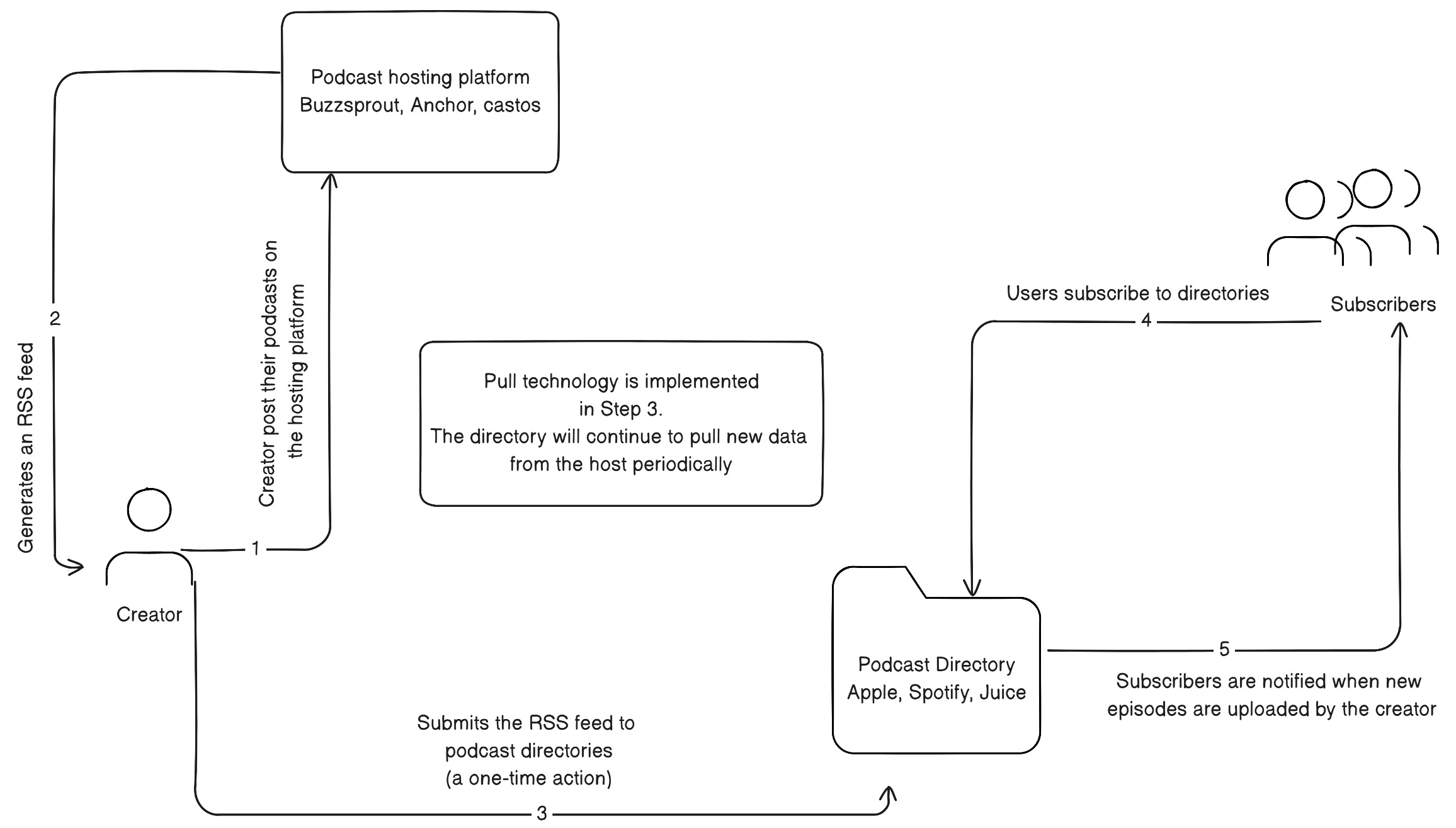
Podcasting is specifically a pull technology. Subscribers manage podcasts using a podcast aggregator, or podcatcher (e.g., iTunes, Juice), which automatically checks for and downloads the latest episodes.
Podcasting is a method of publishing or distributing multimedia content (i.e., audio and video) over the Web. Podcasts are made available through syndication feeds in RSS formats, which enable new content, or episodes, to be automatically delivered to a personal computer. Users subscribe to podcasts that are pushed to aggregators, also called podcatchers. The podcast can then be played on a personal computer or on many video-capable MP3 players.
When a new podcast is published to an RSS feed. It waits on the server until a feed reader, mobile podcasting app, or directory requests it. Directories such as iTunes, Blubrry, Spotify, Apple, and many other app directories request the RSS feed periodically to update the Podcast’s listing on those platforms.
Submitting your RSS feed to a podcast directory is a one-time action; after that, the directory automatically updates with each of your new episodes.
Subscribers to these RSS feeds via app or reader will get the episodes when they request the RSS feed next time, independent of when the directory listing updates.
The main disadvantage of using Pull technology is that it can be quite costly. For instance, if you create an app that displays the stock price of a company to 1,000 customers and you want the quote to be updated frequently, say every 15 minutes, your servers will have to make approximately 100,000 calls to the stock API every day, which can be expensive.
Even though the stock app might change often, think about doing the same thing when checking for a new task, a new post, or a new event. You will see how costly it is for an action that will likely say "No update found" half the time the API responds.
While some technologies are the perfect use case for a pull technology, others are better off using a Push technology.
Push Technology
Push technology is a way of communicating over the internet where the one who starts the transaction is the one who sends the information, usually a central server or publisher.
Push services are often based on information and data preferences expressed in advance, called the publish-subscribe model.
A client subscribes to information channels provided by a server. When new content is available on one of those channels, the server sends or publishes that information to the client. Synchronous conferencing and instant messaging are examples of push services. Chat messages and sometimes files are sent to the user as soon as they arrive at the messaging service.
Decentralized peer-to-peer programs and centralized programs can both push files, which means the sender starts the data transfer instead of the recipient.
This model works like TV and radio broadcasts, but with internet push technology, a server can communicate with a receiver, and the receiver can ask questions based on the information received. This is different from radio and TV, where you can only passively receive information.
Push APIs are best used when you have data that changes a lot and needs to be updated quickly for clients who need to see the changes as soon as possible.
Push APIs allow the server to send updates to the client whenever new data becomes available without the client having to explicitly request them. When the server receives new information, it pushes the data to the client application; no request is needed. This makes it a more efficient communication standard for data that changes often.
Some Push Technologies
In this section, we discuss some of the technologies used to implement the push communication strategy.
Web Push
Web push is a protocol that uses HTTP/2 to send real-time events such as incoming calls or messages. These events are delivered promptly in a process known as "pushing".
The protocol combines all real-time events into one session to use network and radio resources more efficiently. All events are sent to applications in a single service as they happen. This means you only need one session, which saves you money by avoiding duplicate costs.
Web push notifications are an example of using the protocol to send real-time notifications via desktop and mobile web.
These are messages that slide in at the top or bottom right-hand corner of a desktop screen or appear on a mobile device. They look like push notifications and can be seen whenever the browser is open, regardless of whether the user is on the website.
The Anatomy of a web push notification
Web push notifications include the following elements:
Notification Title: The name of the company or brand
Notification Content: The message sent. Character count varies between browsers and operating systems. Although shorter is better.
Notification URL: The domain sending the web notification
Notification Icon: This can be a logo or any image.
Browser Icon: The logo of the browser sending the notification.
Notification Image (known as ”Big Image” or “Large Image”): Some browsers and operating systems support the inclusion of a large image in the web notification in addition to the notification icon.
How Web Push Notifications Work
A company can send notifications to its website visitors without needing an app. To do this, the company needs to install a web-based software development kit (SDK) from a web push service. When users receive a notification, clicking on it will direct them to a pre-selected website that the company has chosen.
The web notification opt-in process
Web notifications are a type of marketing that requires users to give permission before receiving them. Users will see a prompt from their web browser asking if they want to opt-in to receive web pushes.
This prompt is called a browser-level opt-in prompt, or browser-based prompt. Different companies have different ways of handling the opt-in process and the timing of the opt-in request.
Using a “Soft Ask” Opt-in
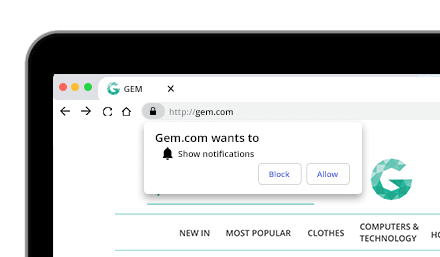
Some companies choose to first display a "soft ask" that explains why a user might want to opt-in to receive web push notifications before showing the prompt from the browser itself. This can be more effective at securing opt-ins than just showing the browser prompt without any context.
However, other companies find that skipping the soft ask and going straight to the browser-based opt-in works just as well or better. Personally, I prefer the first option
Choosing the Timing for Opt-in Prompts
Different organizations have different timings for showing the opt-in message. Some wait until the web visitor goes through a certain number of pages before offering the web push notification opt-in. They may use a soft ask or a browser-based opt-in prompt.
Some websites ask for permission as soon as you arrive on their page. Keep in mind that some web browsers now require users to click a button before the prompt appears.
HTTP Live Streaming
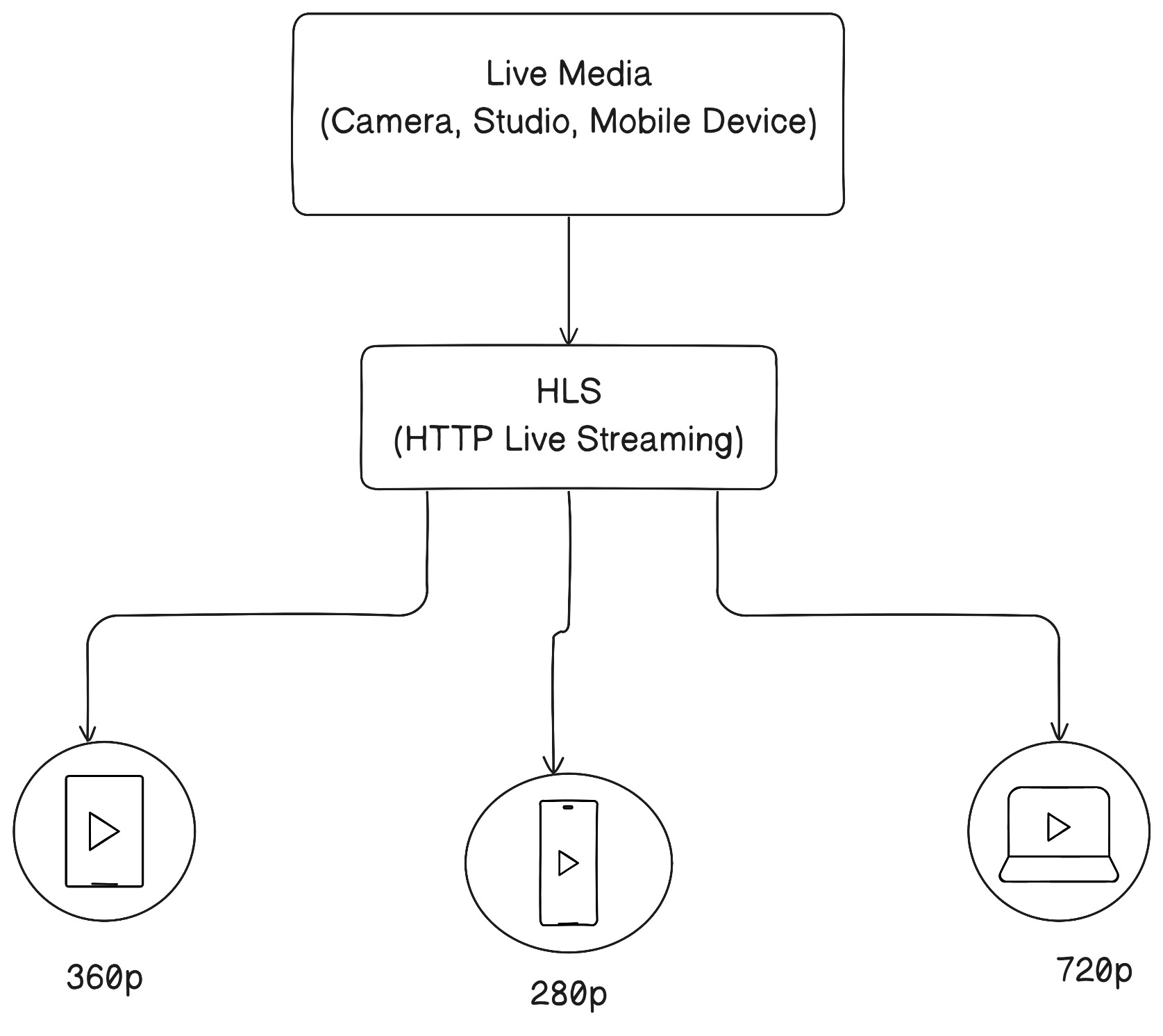
When you use the HTTP Live Streaming protocol, your video will be broken into smaller parts, compressed, and sent over HTTP. HLS will put all of those parts back together into a playlist, and your viewer will see a continuous stream of content without interruptions.
HTTP Live Streaming uses video and audio compression to transmit streams in the MPEG-TS container format. The video is chopped into short 10-second segments, and the HTTP server creates M3U8 playlists (also called manifest files) to keep the bits in order.
HTTP Live Streaming uses a conventional web server that implements support for HTTP Live Streaming (HLS) to distribute audiovisual content and requires specific software, such as OBS, to fit the content into a proper format (codec) for transmission in real time over a network.
HTTP streaming can be done in a few different ways. Usually, the web server doesn't cut off a connection once it sends response data to a client.
The web server keeps the connection open. This allows it to quickly send updates to one or more clients if something changes internally. If the server didn't do this, it would instead have to wait until the client sent another request to get the updates.
Apple created it in 2009. Before that, people used Flash. But hackers attacked Flash because it was popular for video.
Normally, HTTP's default method is to "pull" data from a source. However, HTTP streaming allows for the transfer of dynamic or unstructured data between the server and client without needing to create a new method of transferring data.
How Does HTTP Streaming work?
Let's explore more about HLS streaming and the coding environment it needs.
HLS streaming majorly relies on two types of software:
Encoders: The camera captures input, which is then transformed into video and audio files by encoders. This data is then outputted into either a MPEG file or transport stream.
Hosting platforms: These systems take in coded video, and then the platform divides the data and puts it on a server.
HLS streaming involves:
Input. A camera records both audio and video files and sends them to the encoder.
Encoding. The encoder changes the input into HEVC video and AC-3 audio.
Output. An MPEG-4 file or MPEG-2 transport stream produces the data.
Segmenting. A tool divides the flow into small media files and stores them on the server.
Indexing. The tool that separates the files keeps a list of the media files.
Publishing. The index file's web address is made public, so that client software can use it.
Access. Users access the feed and view the files consecutively without any missing parts.
Although there are several benefits to HTTP streaming, you still have to worry about latency and internet speed. They both determine the experience of the consumer through their delivery.
HTTP Long Polling
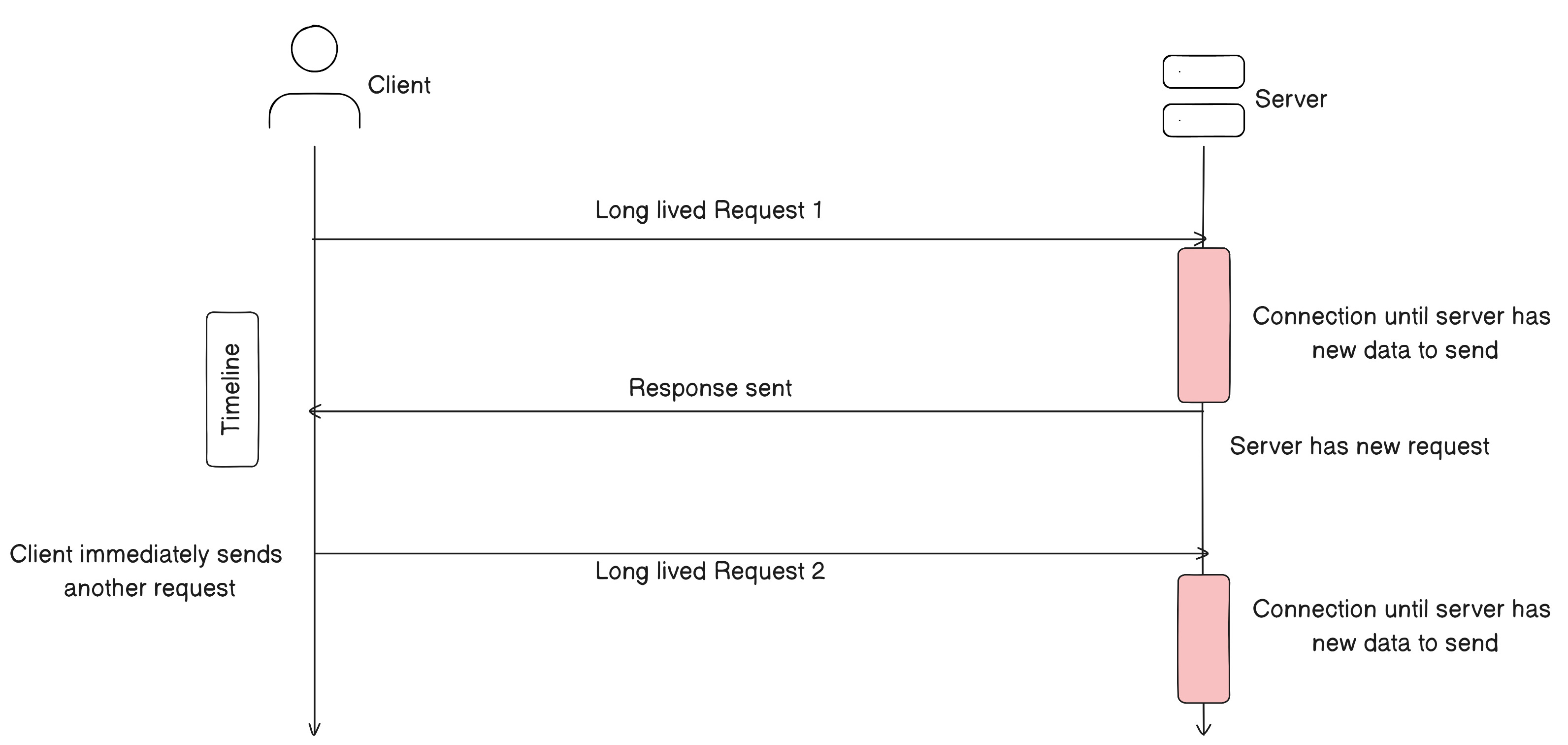
HTTP long-polling is a method where the client asks the server for new information. The server keeps the request open until new data is ready. When it's ready, the server sends the new information back to the client.
When the client receives the new information, it immediately sends another request, and the operation is repeated.
HTTP long-polling is a way for a server to send messages to a client efficiently. It's a type of polling that mimics a server "pushing" data to the client. Long polling is an older technique that was one of the first ways to achieve this kind of data transfer and is still widely supported across all browsers and web technologies.
Even in a time when protocols are specifically made for continuous two-way communication (like WebSocket), the ability to long poll still serves a purpose as a backup mechanism that will function universally.
How Does HTTP Long Polling Work?
To understand long-polling, let’s first consider standard polling with HTTP.
Standard HTTP Polling
HTTP polling involves a client, such as a web browser, repeatedly requesting updates from a server. An example of its use would be someone wanting to stay up-to-date with breaking news.
When someone is reading a news story on a website, they want the page to show the latest updates as the story develops. One way to do this is to have the website keep asking the news server, "Is there anything new about the story?" The server will then reply with any new information or say that there is nothing new.
The rate at which the browser asks for updates determines how frequently the news page updates. Too short a time between updates means there will be lots of “no update” responses, leading to wasted resources and inefficiencies. Too much time between updates will mean important updates are delayed.
These are some problems with the Standard HTTP Polling method. It's hard to find the perfect time between requests for updates. Requests will either be too frequent (and use a lot of resources) or too slow (and updates will take longer to arrive than needed).
As you scale, and the number of clients increases, the number of requests to the server also increases. This potentially becomes inefficient and wasteful as resources are used without purpose.
HTTP Long Polling To The Rescue
The browser sends requests to the server, as usual. But instead of the server closing the connection, it keeps the connection open until there's data to send. The client (browser) waits for a response from the server. When there is data available, the server sends it to the client. Then, the client immediately sends another request to the server using HTTP long-polling.
Considerations When Using Long Polling
There are a couple of things to consider when using HTTP long polling to build real-time interactivity in your application, both in terms of development and operations or scaling.
As usage grows, how will you orchestrate your real-time backend?
Does long polling automatically reconnect when mobile devices switch quickly between Wi-Fi and cellular networks or lose connection entirely and the IP address changes?
With long polling, can you manage the message queue and catch up on missed messages?
Does long polling provide load balancing or failover support across multiple servers?
WebSocket
WebSocket makes it possible for a client to make a data request to a server, and then receive event-driven responses from that server in real-time.
WebSocket is different from many web technologies in that it doesn't use a request-response strategy where a connection is opened during the request and closed after it's fulfilled.
With WebSocket, the connection stays open. This means that the client doesn't need to keep asking the server for updates, which makes the application faster and uses resources better.
A typical WebSocket setup consists of the following elements:
The client makes a request for specific data from the server.
WebSocket Gateway: Provides a WebSocket interface between client and server.
Server: Sends updates to the client through the WebSocket gateway in real-time.
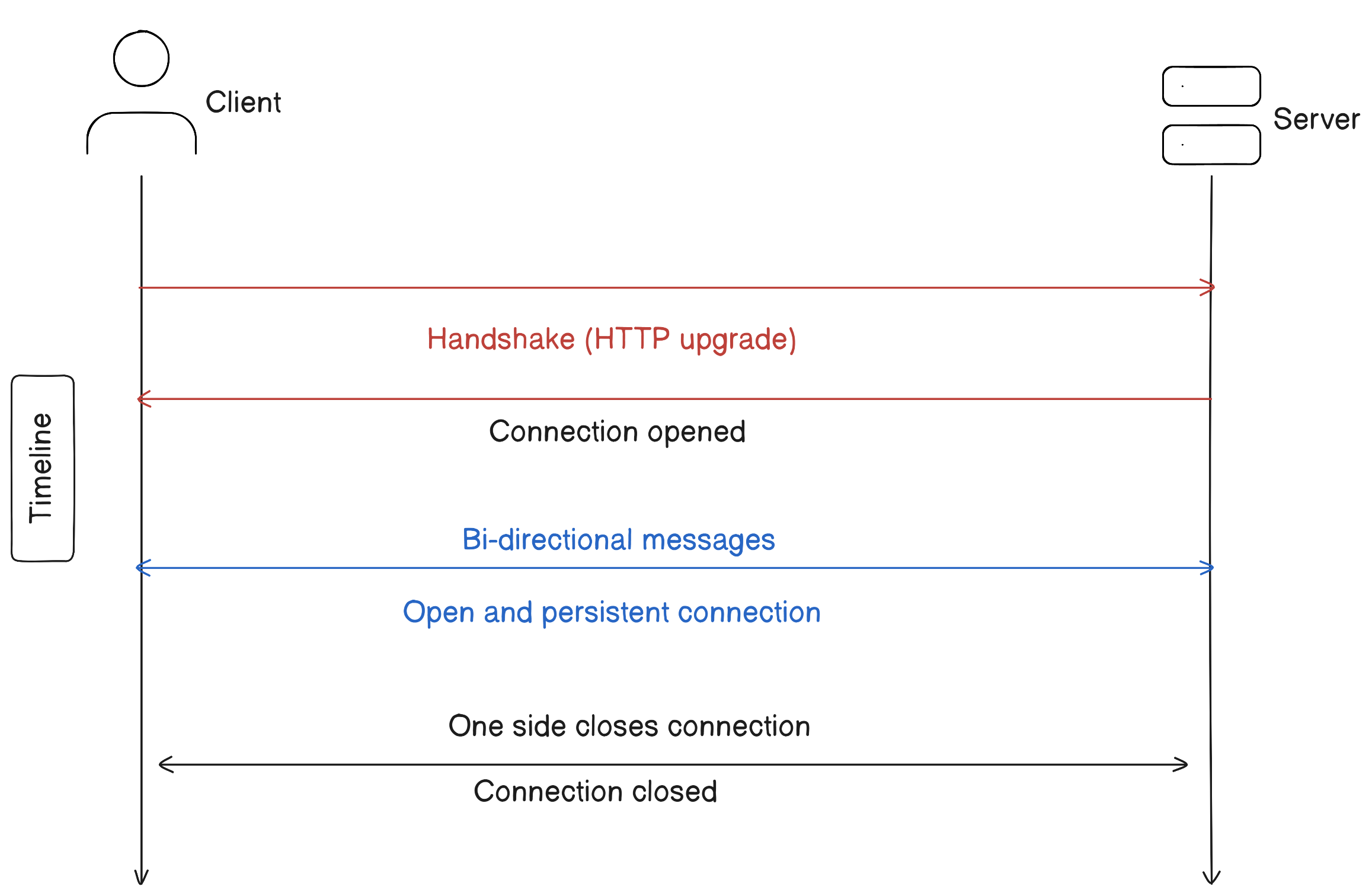
WebSocket is a different way to communicate over the internet than HTTP. First, the client requests to upgrade from HTTP to WebSocket using a special header. After that, they use the WebSocket protocol to talk to each other.
Simply put, instead of using http://example.com, you use ws://example.com. This achieves the following objectives:
Reduce HTTP header overhead by transferring only essential information, which produces a significant reduction in usage and makes real-time communication possible.
Create a full duplex communication environment to get rid of the need for polling and the request-response architecture.
Both the client and server can send data when it is needed. This reduces the amount of network traffic and makes the application faster by removing the delays that usually happen with Web communication.
Use a single TP connection to reduce resource usage.
Maintain an open connection over TP to make data streaming possible.
How Does WebSocket Work?
WebSocket's are relatively straightforward.
Starting with a Handshake
In all cases, the client follows the same order of interacting with either the WebSocket gateway or the server.
The handshake, which depends on the HTTP GET method that the client sends, starts the session.
GET/chatHTTP/1.1
Host: server.example.com
Upgrade: websocket
Connection: Upgrade
Sec-WebSocket-Key: x3JJHMbDL1EzLkh9GBhXDw==
Sec-WebSocket-Protocol: chat, superchat
Sec-WebSocket-Version: 13
Origin: http://example.com
The server responds with these:
HTTP/1.1 101Switching Protocols
Upgrade: websocket
Connection: Upgrade
Sec-WebSocket-Accept: HSmrc0sMlYUkAGmm5OPpG2HaGWk=
Sec-WebSocket-Protocol: chat
This request must use HTTP 1.1 with a variety of headers to perform specific tasks:
Host: Defines the host location.
Upgrade: Specifies that the server should upgrade the request to a WebSocket that uses the WS protocol.
Connection: Defines the connection type.
Sec-WebSocket-key: Provides the server with the WebSocket key, which proves to the server that it has received a valid WebSocket request. This key is only used during the opening handshake and isn’t the same as the key used to mask data. The key comes from an agreed upon source and may even be issued by the API vendor. It contains base64-encoded random bytes, and the server replies with a hash of the key in the Sec-WebSocket-Accept header.
Sec-WebSocket-Version: Determines the WebSocket version.
If the server can’t handle the request, it responds with a 400 Bad Request error. Otherwise, it sends an HTTP response. The header contains a key that verifies to the client that it has contacted the correct server.
Establishing and Using The WS Connection
The use of the WS protocol means doing things in the WebSocket way—with events.
Data moves between client and server using a series of messages that include data frames.
Writing custom code or use a well-established library that can receive and interpret the four WS events. Namely:
Open: Occurs when the WebSocket connection is established between client and server using the initial handshake.
Message: This happens during the entire open phase of the connection. Client and server can both push messages using the same bidirectional TCP connection.
Error: This signals that a communication problem has happened. The message always includes an error code, which may actually signal a normal event. For example, an error code of 1000 specifies that the connection closed normally.
Close: This occurs when the WebSocket connection closes.
Summary
When it comes to designing system architecture, it's important to understand that there is rarely a one-size-fits-all solution. In fact, system architecture is often a combination of push and pull methods, because different application services have different use cases.
To get the most out of your system, it's important to choose the right architecture for your specific use case. This means taking into account factors such as the frequency of updates, the amount of data being transferred, and the cost of the system. By understanding these factors and choosing the right architecture, you can maximize the potential of your system and provide the best experience for your users.
We hope you found this issue interesting and educational. If so, we would really appreciate it if you could leave a comment or a reaction. Also, consider subscribing to our newsletter here. We're committed to delivering one issue per week, and your subscription would be a great motivation for us to keep up the pace. Thank you for your support!
Cheers
Happy learning!