
DB-EP1: 5 Data Models That Make the Difference

In the dynamic world of modern business, data has become the cornerstone of decision-making. From tracking customer behavior to optimizing supply chains, the ability to harness and analyze data is a key differentiator. But beneath the sleek dashboards and powerful analytics lies a crucial foundation: effective database data modeling.
Before databases, computers used a file-based system for data management. This was less efficient and more expensive. The system had several application programs for manipulating data files. Databases solved problems like data redundancy, inconsistency, difficulty accessing data, and security vulnerabilities such as unauthorized access.
But even databases need a way to share their data and maintain compatibility across systems. If the same data structures are used to store and access data, then different applications can share data. In this issue, we are discussing the concept of data models and how they can help shape the way we build scalable applications that interact with the real world. We will be focusing on the following:
What is a database management system?
Data model as a classification for the DBMS
The data model categories like relational, network, document, hierarchical, and dimension
It’s going to be an interesting issue; stick to the end. Let’s discuss.
What is a database management system?
A DBMS (Database Management System) typically consists of a suite of software made up of various integrated components. Together, these components form a system that enables organizations to efficiently and easily create, access, and modify data in databases.
For a database to be considered a management system, it has to facilitate the process of managing data.
Defining a database involves defining the data types, structures, and constraints of the data to be stored in the database.
Constructing the database is the process of storing data on a storage device that is controlled by the DBMS.
Manipulating a database involves querying the database to retrieve specific data, updating the database, etc.
Sharing a database allows multiple users and programs to access the database simultaneously.
How does it work?
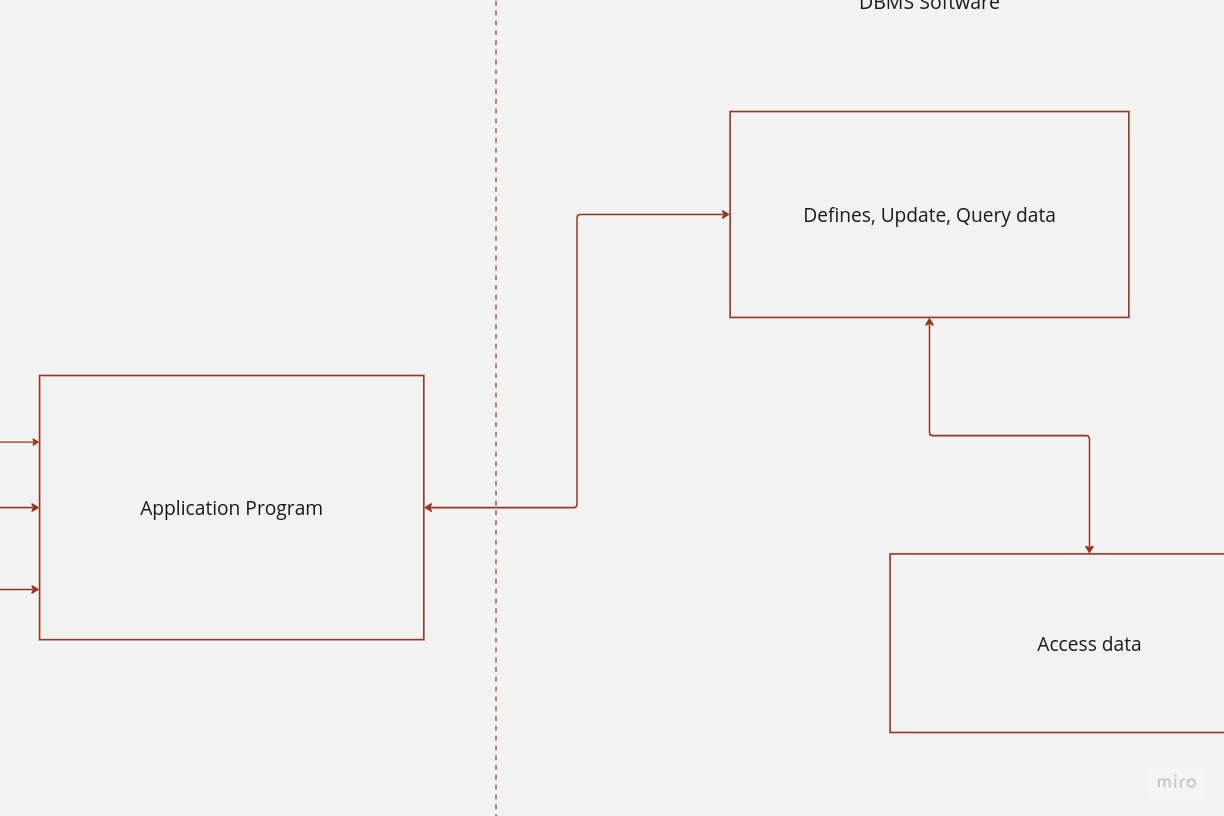
Imagine a large retail company with departments ranging from sales to inventory management. Each department has its own specific data needs. The sales team uses an application program to request sales data for a particular product, while the inventory management team seeks information on stock levels. These application programs act as user-friendly interfaces, allowing the sales and inventory teams to communicate their data requirements to the DBMS.
In this scenario, the DBMS is the software system that handles these requests. It interprets the sales and inventory data queries from the application programs, retrieves the relevant information from the database, and provides the results back to the respective teams. This process ensures that the right data is accessible to the right departments, enabling them to make informed decisions about sales strategies and stock replenishment.
DBMS can be classified based on various criteria:
Data Model
Storage Medium
Disk Layout
Access Pattern
In this issue, we will focus on classifications based on the data model.
DBMS: Data Models
A data model constitutes a collection of principles utilized to articulate information, encompassing elements like data connections, the meaning behind the data, and stipulations imposed on the data. When it comes to housing data within a database system, the need for data structures arises. Consequently, the database systems we commonly employ incorporate intricate data structures that extend beyond conventional usage.
There are five types of DBMS based on their data models. Let’s discuss them.
Relational Data Model
The relational data model, introduced by E.F. Codd in 1970, stands as the most extensively adopted approach within the realm of Database Management Systems (DBMS). Within this model, a relation or table serves as an arrangement of data components, thoughtfully structured in a tabular layout consisting of rows and columns.
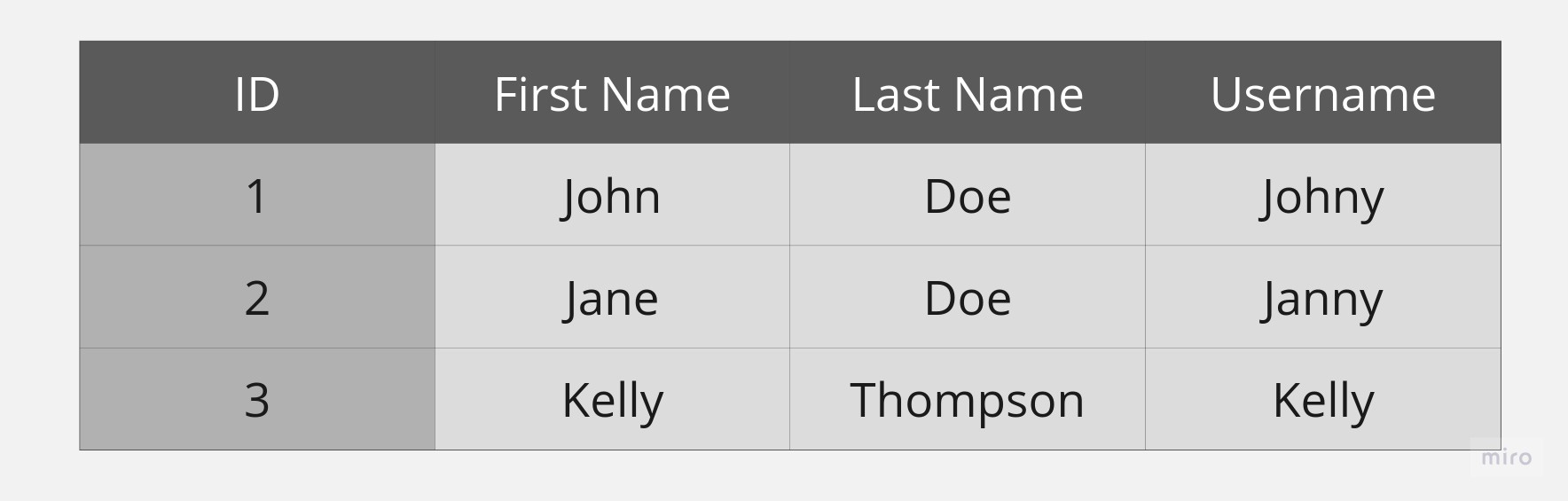
Let’s define the different elements present in a table:
Tuple: A tuple is a data structure that represents a single entity within a table, and can be thought of as akin to a row in the table. Each tuple consists of a collection of properties that represent a real-world entity. For example, in the table presented above, each row represents a user, and the properties of each user are contained within that row/tuple. In essence, tuples provide a way to organize and manage related data in a structured way, and are a fundamental building block of relational databases.
Attribute: Attributes are the properties of a tuple. These characteristics provide descriptive information about the entity being represented in the data model. In the table above, there are several user attributes that can be used to identify and differentiate between various users. In addition to the ID, First Name, Last Name, and Username attributes, there may be other attributes, such as email address, date of birth, and location, that can also be included to provide a more detailed representation of the users.
Data Type: A data type is a classification of data that specifies the type of value that can be stored and the operations that can be performed on it. There are several data types, including integers, floating-point numbers, characters, and Boolean values. Each data type has its own set of rules for how it can be used and manipulated.
Degree: The degree of a tuple is the total number of attributes that it contains. In the table provided above, the degree is 4, indicating that each tuple in the table contains 4 attributes. It is important to note that the degree of a tuple can vary across different tables.
Cardinality: Cardinality is an important concept in relational databases. It refers to the total number of tuples or rows in a relation or table. In the context of the table provided, the cardinality is 3, which means that there are 3 tuples in the table.
Relation Key: A relation key is an attribute that plays a crucial role in uniquely identifying a tuple. It acts as a fundamental component of the database schema, enabling the creation of relationships among tables. In the above table, the ID serves as the relationship key, allowing for the establishment of a connection between the data in this table and data in other tables in the database. Without this key, the table would be incomplete and lack the ability to relate to other tables, resulting in a significant loss of information and functionality.
Relational Schema: A relational schema is an essential aspect of relational database management systems, as it serves as a blueprint that outlines all the attributes and their corresponding data types. This blueprint ensures that every tuple that is a part of the relation abides by the specified rules and guidelines.
Relationship Constraints: The relationship constraints define the way in which two or more entities are related to each other based on shared attributes. Additionally, relationship constraints can be used to further specify the nature of the relationship, such as whether it is one-to-one or one-to-many.
The data model expresses a declarative method for storing, accessing, and manipulating tuples. While using this model, end users specify the information they want to access and manipulate. This information may include various aspects, such as the type of data, its source, and its intended use. Then, the DBMS translates the query into an appropriate implementation—a specific execution plan.
This execution plan may include various steps such as indexing, sorting, and filtering. After that, the DBMS retrieves the requested information and presents it to the end user. This process of data retrieval and presentation may involve several layers of abstraction and optimization. For example, the DBMS may use caching, compression, and parallel processing to enhance the performance and scalability of the system.
Relational models use SQL to interact with databases. That's why it's called an RDBMS, because it uses relational models.
SELECT first_name, last_name, username FROM users WHERE id = 3;In this case, SQL specifies the data to be accessed, and the underlying implementation determines the exact sequence of steps required to retrieve the data. PostgreSQL and MySQL are typical examples of commonly used relational database management systems (RDBMS).
Hierarchical Data Model
The hierarchical data model is an old way of organizing data, created by IBM in 1960. It puts the data in a tree-like shape, where each piece of information is stored in a node and connected to other nodes by edges or links.
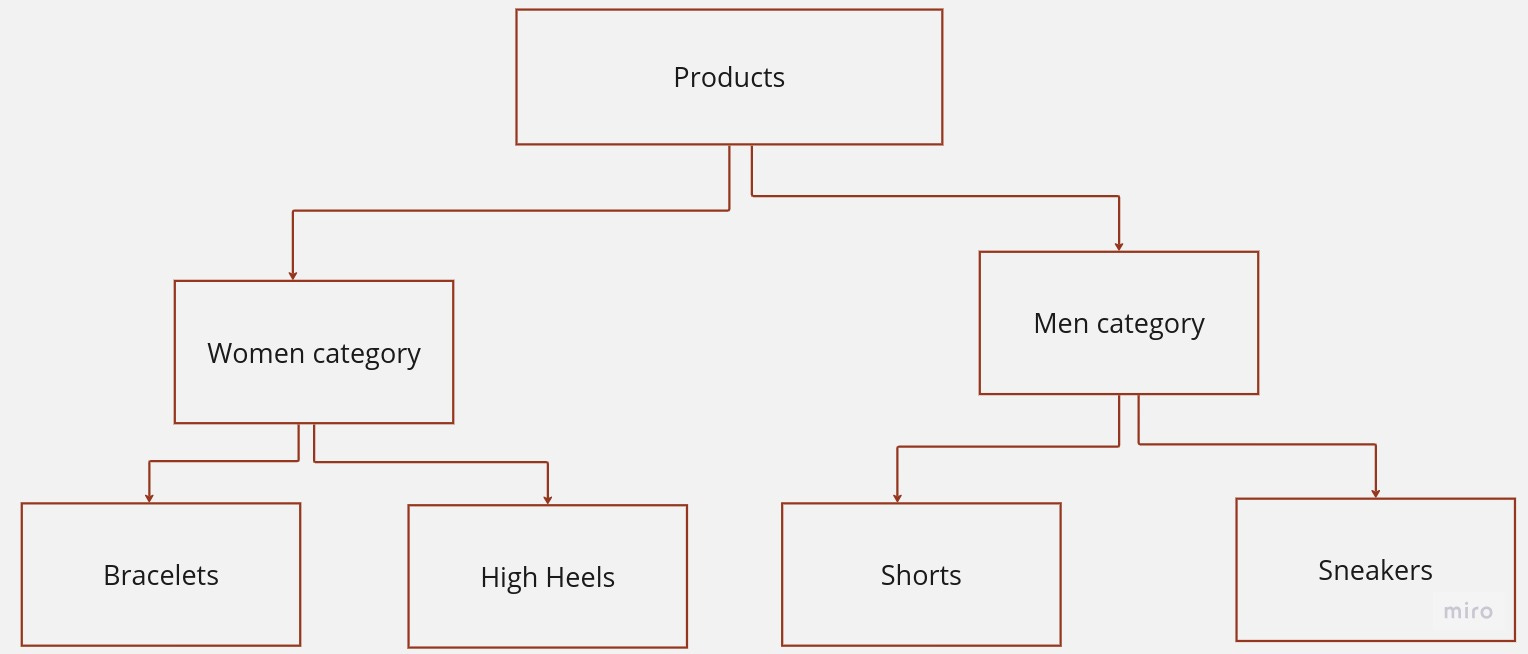
The data is stored as records that are linked to each other. A record is a collection of fields, with each field containing only one value. The record type determines the fields that the record contains.
The tree structure is a graphical representation of a parent-child relationship between nodes, where each child node has only one parent node. The topmost node in the tree, also known as the root node, represents the beginning of this hierarchy.
The model is designed to support two types of connections: 1:1 and 1:Many. The connections are supported because they allow a parent node to have one or more children, enabling a more complex hierarchical structure. However, the model is currently unable to support many-to-many relationships, which would require the ability for child nodes to have multiple parents.
IBM Information Management System
IMS (Information Management System) is a hierarchical database management system developed by IBM. The system organizes data into segments with parent-child relationships. Each segment stores information about a particular category in fields.
For instance, a customer database has a root segment with fields such as name, address, and email. Related segments like orders or invoices can also store information.
Child segments can be added under another segment to track specifics about each item, like quantity and price. This helps companies analyze customer behavior and sales performance to make informed decisions.
The way we organize data in databases has changed over time. The hierarchical data model was used a lot, but now most people use the relational model. Even though the hierarchical model is not as popular, it is still used in important applications like banking, healthcare, and telecoms because it performs well and is reliable.
Network Data Model
In 1969, Charles Bachman formulated the network data model, which revolutionized the way entities and their relationships were represented. Unlike the hierarchical model, which has tree-like structures, the network data model organizes data like a graph, providing more flexibility in its representation.
In the network data model, the information is stored in nodes, and edges or links connect the nodes. This provides a more dynamic approach to representing data. Moreover, the model allows each child node to have multiple parent nodes, creating a directed graph-like structure that allows for more flexible navigation between the nodes.
The network data model has become a fundamental concept in computer science and has been used in the development of many modern databases. Its versatility has made it a popular choice for various applications, including social networking sites, where the relationships between users can be represented using a network data model.
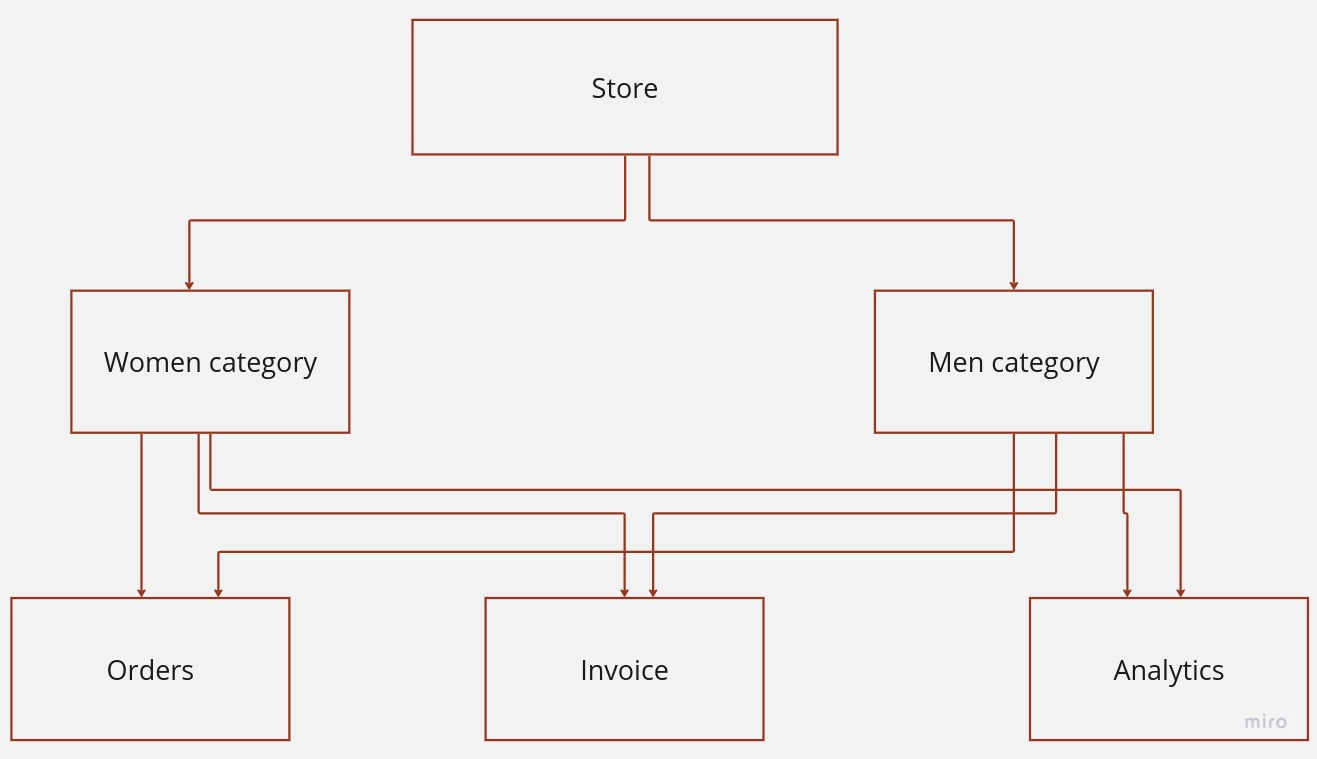
Specifically, it supports 1:1 relationship, where one record is linked to another record; 1:Many relationships, where one record is linked to multiple other records; and many-to-many relationships, where multiple records can be linked to multiple other records.
In contrast to the hierarchical database model, which structures data as a tree of records with each record having one parent record and many children, the network model allows for greater flexibility in data management. By allowing each record to have multiple parent and child records, the network model creates a generalized graph structure that can more accurately represent complex relationships between data points. This structure can be especially useful in scenarios where data relationships are not strictly hierarchical, but rather involve multiple interrelated data points.
Some network-model database systems
Some well-known database systems that use the network model include:
IMAGE
IMAGE uses a proprietary multi-valued database approach, allowing each record to have multiple values for each attribute. It stores data in dynamic arrays, offering flexibility for applications that need to handle varying data sizes. The network structure of the database allows records to be linked in complex ways, supporting diverse relationships.
The IMAGE DBMS and its derivatives gained popularity for their efficiency in handling large amounts of data with complex relationships. However, as relational databases like SQL gained prominence, the use of network-based models like IMAGE diminished. Nevertheless, these systems still have dedicated user bases in specific industries and applications.
IDMS—Integrated Database Management System
IDMS organizes data into records, which are grouped into sets. The relationships between records are established through sets and pointers, forming a network structure. Record types, relationships, and data integrity rules are defined using Data Definition Language (DDL). IDMS also provides facilities for data storage, retrieval, and maintenance.
IDMS was prominent during the era of mainframe computing, serving as a powerful solution for managing complex and interrelated data. However, with the rise of relational databases and modern database systems, the use of IDMS declined. Many organizations have transitioned to newer technologies for their database needs.
Document Data Model
The Document data model is a non-relational, or NoSQL, database model that stores and retrieves data in a way that resembles documents. This model is designed to handle semi-structured or unstructured data, making it well-suited for scenarios where data doesn't conform to a fixed tabular structure like in traditional relational databases.
In the Document data model, data is stored in documents, which are typically represented in formats like JSON (JavaScript Object Notation) or BSON (Binary JSON). Each document is self-contained and can have its own structure, fields, and data types. Documents can also be nested, allowing for complex data structures. The model doesn't require a predefined schema, offering flexibility to handle evolving data requirements.
{
    "first_name": "John",
    "last_name": "Doe",
    "username": "Johnny",
    "contacts": [
        {
            "type": "email",
            "value": "johndoe@gmail.com"
        },
        {
            "type": "phone",
            "value": "+234567890"
        }
    ]
}
Examples of Document Databases:
Let’s discuss the different examples for document data models.
MongoDB: One of the most popular document databases, MongoDB stores data in BSON format. It allows developers to store, query, and manipulate data in a highly flexible manner. MongoDB is commonly used for web applications, content management systems, and real-time analytics.
Couchbase: This document database provides high performance and availability. It's often used for applications requiring low-latency responses, like e-commerce platforms and mobile applications.
Cassandra: Although primarily known as a wide-column store, Cassandra also supports document-like data structures through its "collections" feature. It's used for applications that require scalability and high availability, such as IoT applications and time-series data storage.
The Document data model is particularly beneficial when dealing with data that has varying structures or when rapid development and iteration are required. It empowers developers to work with data in a more natural way and is well-suited for use cases involving content management, cataloging, user profiles, and other scenarios where data doesn't fit neatly into tables and rows.
Dimensional Data Model
The dimensional data model is a way to represent data in a data warehouse. It's based on the relational data model, which was created by Ralph Kimball in 1966. In this model, data is organized into facts and dimensions.
It is a database design approach specifically tailored for data warehousing and analytical purposes. It provides an optimized structure for storing and querying data, with a focus on facilitating efficient and fast reporting and analysis.
There are two types of dimensional data models:
Star Schema
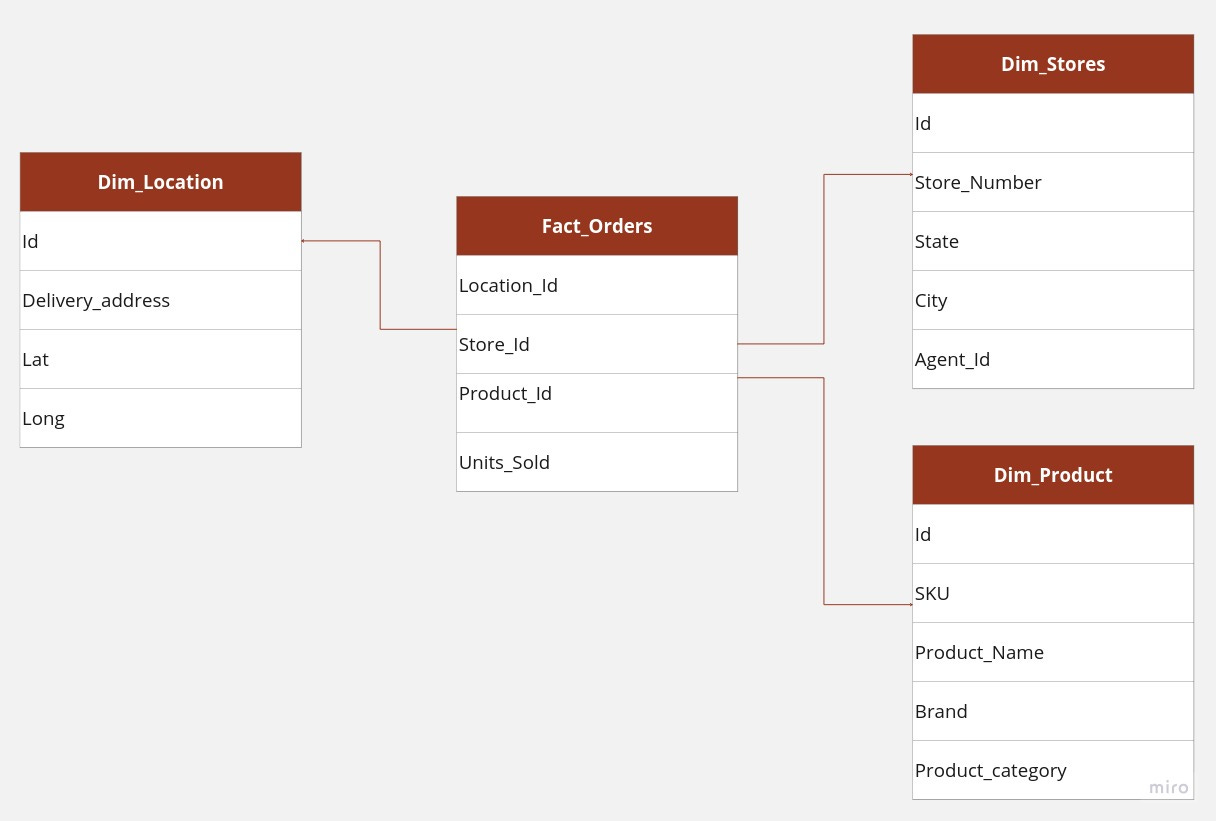
The star schema is a way of organizing data where there is one main table called the fact table and many smaller tables called dimension tables. The fact table is the center of the schema, and the dimension tables are arranged around it like points on a star. You can have more than one fact table in a star schema, and each fact table can reference any number of dimension tables.
Fact tables
The Fact table records measurements for a specific event. Fact tables generally consist of numeric values and foreign keys to dimensional data where descriptive information is kept.
Fact tables are generally assigned a surrogate key to ensure each row can be uniquely identified. This key is a simple primary key.
Dimension tables
Dimension tables usually define a wide variety of characteristics, but some of the most common attributes defined by dimension tables include:
Time dimension tables describe time as the lowest level of time granularity for which events are recorded in the star schema.
Geography dimension tables describe location data, such as country, state, or city.
Product dimension tables describe products
Employee dimension tables describe employees, such as salespeople.
Range dimension tables describe ranges of time, currency values, or other measurable quantities to simplify reporting.
Dimension tables are an essential component of a data warehouse that stores descriptive information about the business. The surrogate primary key assigned to these tables is a unique identifier that is used to facilitate the efficient retrieval of data. Typically, this is a single-column integer data type, which is mapped to the combination of dimension attributes that form the natural key.
By using surrogate keys, developers can avoid the inefficiencies associated with using natural keys as primary keys. This approach ensures that the data warehouse can scale effectively, even as the size of the database grows, and that queries can be executed quickly and efficiently. Furthermore, surrogate keys provide a level of abstraction that simplifies the design of the data warehouse, making it easier to maintain and update over time.
Example of a star schema
SELECT
	P.Brand,
	S.Country AS Countries,
	SUM(F.Units_Sold)

FROM Fact_Orders F
INNER JOIN Dim_Location L    ON (F.Location_Id = L.Id)
INNER JOIN Dim_Store S   ON (F.Store_Id = S.Id)
INNER JOIN Dim_Product P ON (F.Product_Id = P.Id)

P.Product_Category = 'phone'

GROUP BY
	P.Brand,
	S.Country
Consider a database of orders, such as those from an e-commerce application, classified by location, product, and store. Each order can be represented as a fact within the Fact_Order table, and there are three-dimension tables: Dim_Location, Dim_Product, and Dim_Store.
Each dimension table has a primary key on its Id column, relating to one of the columns of the Fact_Orders table’s three-column primary key (Location_Id, Store_Id, Product_Id). The non-primary key Units_Sold column of the fact table in this example represents a measure or metric that can be used in calculations and analysis.
Snowflake Schema
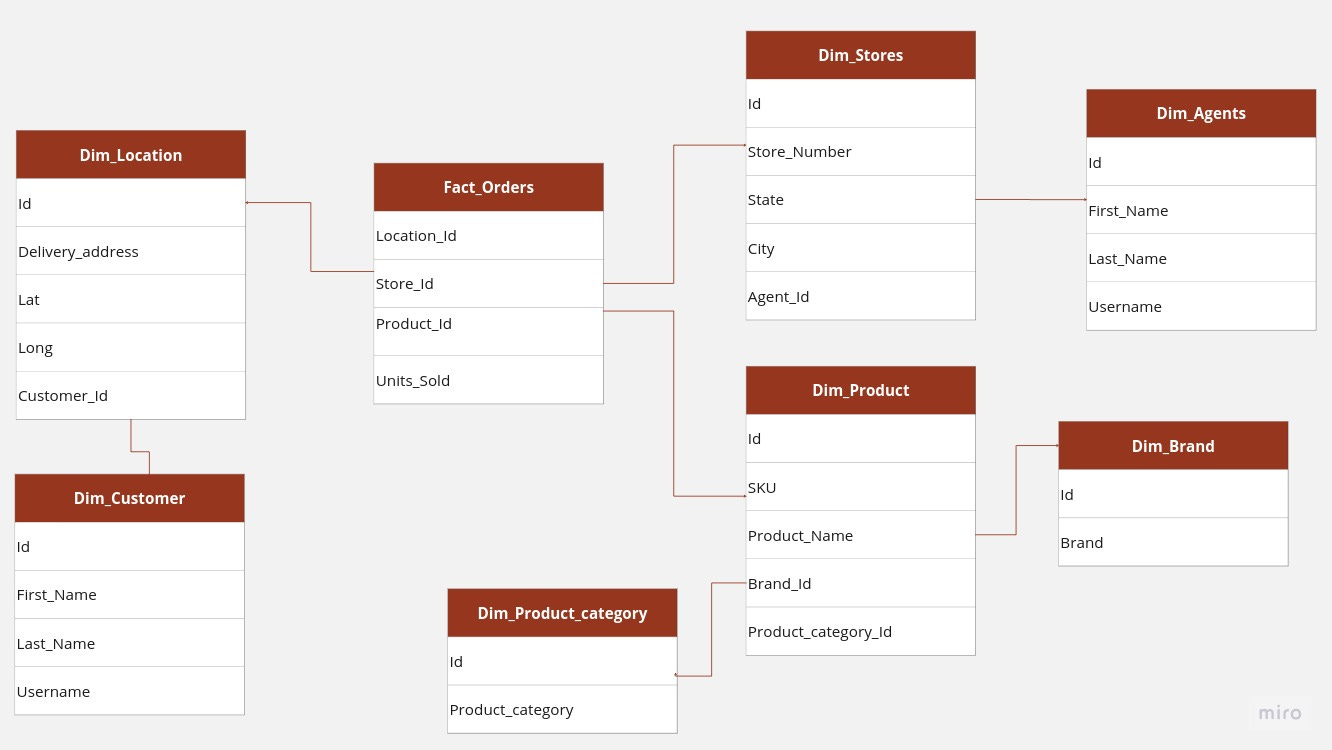
The snowflake schema is a type of database schema that is an extension of the more common star schema. While the star schema is a simpler layout with one central fact table surrounded by dimension tables, the snowflake schema takes things a step further by adding additional dimension tables that are connected to other dimension tables. This ends up creating a more denormalized and complex representation that looks like a snowflake, hence the name.
In the snowflake schema, the central fact table is still present and connected to multiple dimensions, but there are additional dimension tables that are connected to other dimension tables, making it look like a snowflake. The fact table is still located in the center of the schema, while the dimension tables are arranged around it.
This type of schema is useful when there are many dimensions that need to be normalized and organized in a way that reduces redundancy and improves data integrity. The snowflake schema is a logical arrangement of tables in a multidimensional database that is designed to make it easier to access and analyze data.
Overall, the snowflake schema is a more complex and denormalized version of the star schema that is useful for handling large amounts of data with many dimensions. While it may take more effort to set up and maintain, it can be a valuable tool for organizing and managing large datasets with many different dimensions, making it easier to access and analyze the data in a meaningful way.
Example of Snowflake Schema
The query below is like the star schema example, but uses a snowflake schema. It shows the total number of phone units sold by city and brand.
SELECT
	B.Brand,
	A.First_Name,
	SUM(F.Units_Sold)
FROM Fact_Orders F
INNER JOIN Dim_Location L             ON F.Location_Id = L.Id
INNER JOIN Dim_Store S            ON F.Store_Id = S.Id
INNER JOIN Dim_Agents A        ON S.Agent_Id = A.Id
INNER JOIN Dim_Product P          ON F.Product_Id = P.Id
INNER JOIN Dim_Brand B            ON P.Brand_Id = B.Id
INNER JOIN Dim_Product_Category C ON P.Product_Category_Id = C.Id
WHERE
	C.Product_Category = 'phone'
GROUP BY
	B.Brand,
	L.City
Rounding Up…
Choosing the right way to organize data affects how well an application works. If developers understand the different ways to organize, store, and get data, they can make good choices that make the application work better. This is very important when dealing with different types of data, whether it's organized in a certain way, not organized much, or used for analysis.
I hope you enjoyed diving into the world of data models with this issue. 🤓 Whether you're intrigued by the intricacies of relational databases, the flexibility of document models, or the analytical prowess of dimensional models, understanding these concepts can truly elevate your software game.
Did the article provide you with valuable insights? 🤔 If so, why not share the knowledge with your fellow curious minds? Spread the word and invite your friends and colleagues to join our newsletter community! Let's embark on a journey of continuous learning together.
Cheers
Happy learning!